Clickability service requests: the Reserve feature explained
Important changes to the way you accept service requests.
By Clickability · Originally published 6 August 2024
Original article and dated context
Our goal is always to be working closely with our accredited providers and listening to feedback on our platform to help us continue improving our platform.
We know that in-demand modalities often have service requests claimed within seconds of them getting released and we want to ensure providers have adequate time to review the information and make an informed decision on if that participant is a suitable match.
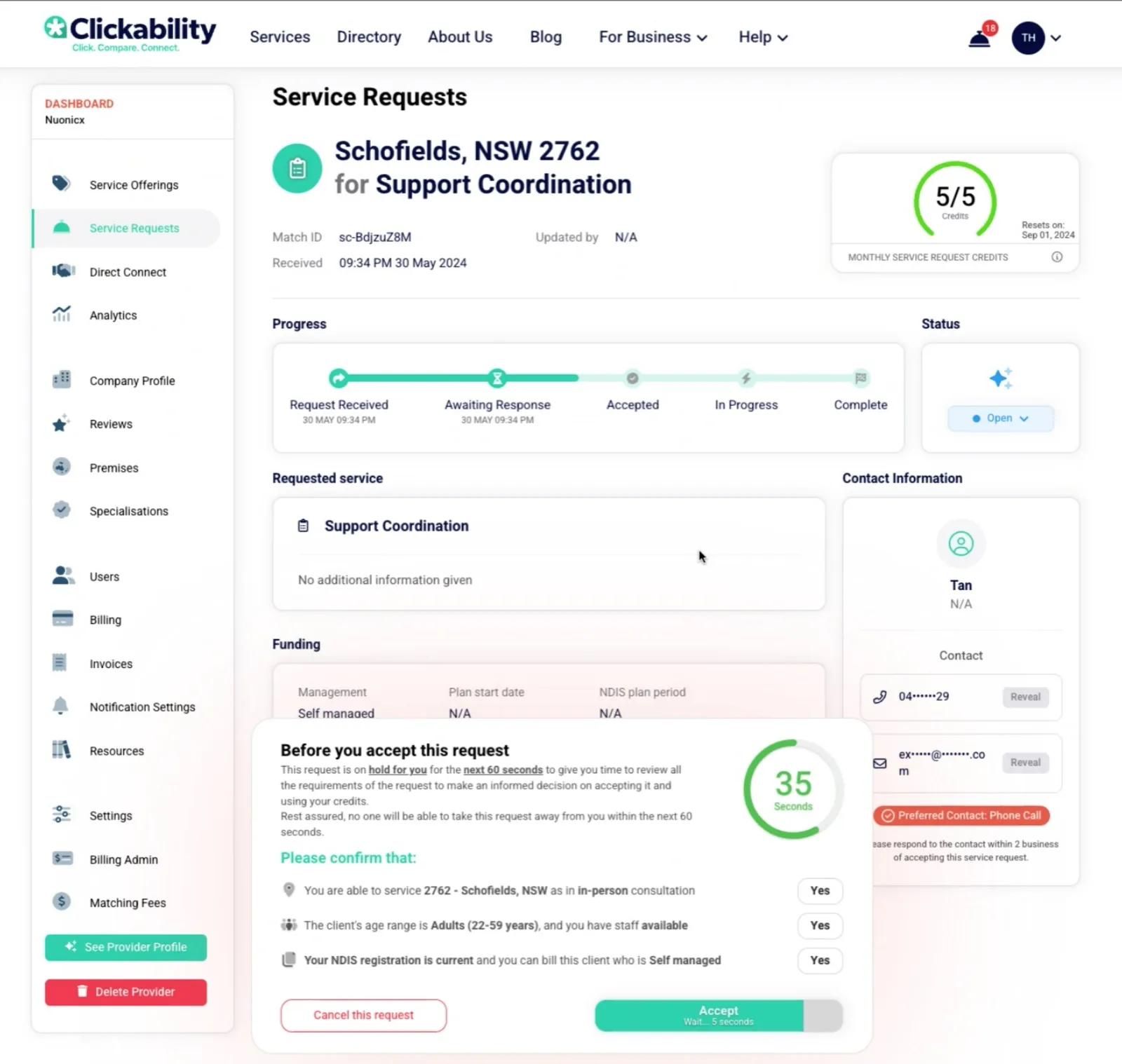
To facilitate this, we have introduced a ‘Reserve’ feature which will replace the ‘Accept’ button. This will hold the service request for you for 60 seconds to give you time to review the request, confirm the location, ensure you have suitable capacity and review any additional requirements given.
Starting in mid-August 2024 there will be a dialog shown after you select the ‘Reserve’ status after this pops up you will need to wait 30 seconds before the accept button can be pressed.
You will also need to confirm the location, demographic and NDIS information is suitable by clicking the YES button, which after the timer goes past 30 seconds it will unlock the accept button for that request. You will then have another 30 seconds to accept the request, after this time it will be released for other providers to accept.
Clickability editorial update: October 2026
Use the reserved time to confirm fit before accepting
Review the service, location, capacity and requirements carefully. Do not accept solely because the request may disappear quickly. The published Reserve help guide describes a 60-second hold and acceptance conditions; check the live screen and current help if they differ.
Accepting a lead does not establish an agreement to deliver services. Contact the participant appropriately, confirm what you can offer and respect their decision about whether to proceed.
Questions readers ask
Does the published help guide describe the same Reserve timings?
Yes, the guide opened for this refresh describes the 60-second hold and 30-second wait. The live interface was not tested. Official guidance
Does accepting a request establish the participant’s agreement to purchase?
No. Confirm the service arrangement with the person.
Help participants find services that meet their requirements
Participants and supporters can describe the assistance needed through Clickability and compare provider profiles and reviews before choosing.