Clickability contact preferences: a clearer view for providers
Supporting Choice and Control in How Participants Are Contacted
By Clickability · Originally published 28 July 2025

Original article and dated context
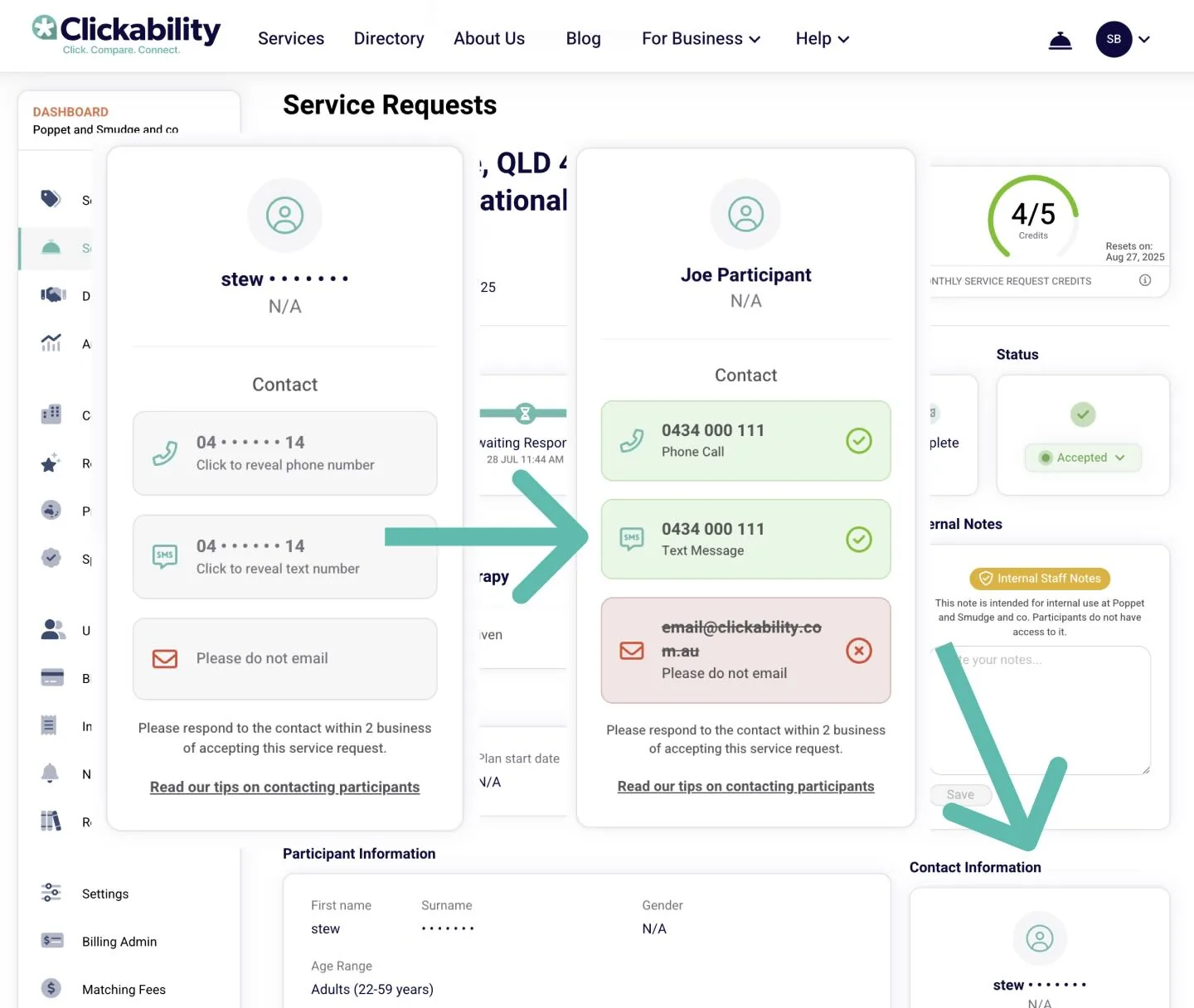
- Clear labels indicating which methods of contact a participant prefers
- A visual "contacted" indicator that shows if you’ve already reached out.
- A redesigned layout that makes it easier to quickly scan all details at once.
- Contact details which have been enabled can be easily copied and pasted.
- A link to our updated help article for best practices when contacting participants.
- 🧠 They decide how they want to be contacted
- 🙌 Their preferences are clearly communicated to providers
- 🔐 They’re protected from being contacted in ways they haven’t agreed to
[Clickability update, September 2026: The preference tells providers which channels the participant has chosen. It does not guarantee that unwanted contact is technically impossible. Providers remain responsible for respecting the choice. Read the published contact guide.]
- ✔️ More confidence they’re reaching out the right way
- 🕵️ A quick visual cue if a participant’s already been contacted
- 🧩 Less ambiguity when multiple contact methods are listed
- 📚 Easy access to a quick-read guide for best practices
Clickability editorial update: September 2026
How providers should use the contact preference
Before reaching out, check the participant’s chosen channel. Send a concise introduction explaining who you are, why you are contacting them and which service request you are responding to. Do not use a channel they have declined simply because it is quicker for your team.
Record the contact so another staff member does not repeat the same introduction. Clickability’s published guide asks providers to make contact within two business days of accepting a request; this is a provider expectation, not a guarantee of a participant response.
What participants can include in a service request
Choose the contact method that works for you and explain any useful access details, such as needing time to reply or wanting a support person involved. You can compare a provider’s response with what you asked for before deciding to proceed.
If contact arrives through a channel you did not choose, tell the provider your preference and raise a continuing problem with Clickability. A service request starts a conversation; it does not commit you to using that provider.
Questions readers ask
Does accepting a request mean the participant has chosen the provider?
No. It allows the provider to contact the participant about the request; the participant still decides whether to proceed. Official guidance
Can the preference display guarantee there will be no unwanted contact?
No. It communicates the preference, which providers must respect. The display itself is not a guarantee against misuse.
Request support and choose how providers reach you
Tell Clickability which service you need and how you prefer to be contacted. Explore provider profiles and reviews before deciding who to work with.